Keys
Best arranger keyboards for beginners
An arranger keyboard plays a backing band behind you. That is either the most motivating feature in the category or a gimmick you use once, and it depends entirely on who you are.
By Sawyer V. · Published · Last updated
An arranger keyboard is one where you hold a chord in your left hand and the instrument plays a whole band behind you: drums, bass, and harmony parts, in a style you pick.
It is the most divisive feature in the keyboard category. For some players it is the reason they practice every day. For others it is a novelty exhausted in a weekend, and the money would have been better spent on the piano sound.
Every pick states its Starter Path band, and we have not physically tested any of them — the method is on how we pick.
Buy an arranger if you want to perform recognizable songs quickly, if the player needs motivation, or if you play solo for other people. Buy a simpler board if the goal is learning piano properly — the money is better spent on the sound and the action.
What auto-accompaniment actually does
The keyboard splits at a point you set. Your left hand plays chords in the lower zone; your right hand plays melody in the upper zone.
The instrument reads the chord, then plays a drum pattern, a bass line and harmony parts that follow it, in whichever style you have chosen. Change the chord and the whole arrangement follows.
Most arrangers also give you intro, fill and ending buttons, so a performance has real structure. That combination is what makes a competent player sound like a band, and it is why arrangers dominate solo restaurant and function work.
Who it genuinely suits
Players who want to perform songs now. The single biggest argument. A beginner who can hold three chords can play a complete-sounding song in week two, and early musical output is the strongest predictor of whether anybody continues.
Children. Rhythm styles are fun, and fun is what gets a child back to the instrument. Our wider view on children’s boards is in best keyboards for kids.
Solo performers. Anyone playing alone for an audience — a care home, a function, a church group — is doing the job an arranger was designed for.
Self-teaching adults who want structure. Playing along with a fixed tempo backing is genuinely good rhythm practice, and it is unforgiving in a useful way.
Who it does not suit
Anyone working toward graded exams. No syllabus uses auto-accompaniment, and the practice time is better spent on two-handed playing.
Anyone who wants the best piano sound at the price. Features cost money. A board spending its budget on 600 voices and 200 rhythms is not spending it on the piano voice or the speakers.
Players who find it does the work for them. The honest risk: single-finger chord modes mean the left hand never learns to play anything. That is fine as a feature and a problem as a habit.
The picks
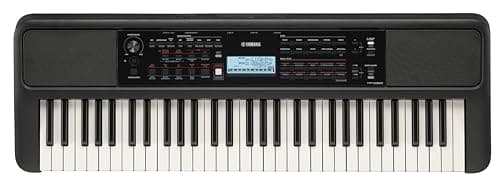
The Yamaha PSR-E383#ad is the full arranger here and the most features per dollar. A wide voice library, a large set of rhythm styles, and a built-in lesson system that works through an onboard song library — genuinely useful for a self-teaching beginner who wants structure without a teacher or a subscription.
Against it: it is the heaviest and largest of the three, the voice count is padded the way every arranger’s is, and a features list this long is exactly what tempts a student to explore menus instead of practicing.
The Casio Casiotone CT-S200#ad is the simpler option and our pick for a child. It keeps the two things we refuse to compromise on — full-size keys and touch response — with enough accompaniment to be fun and not so much that the features become the activity. It is also the lightest board here.
Against it: the piano voice is clearly the weakest of the three, and the accompaniment set is basic next to the Yamaha’s.
The Casio Casiotone CT-S1#ad is on this page as the deliberate opposite, because a good number of people arrive looking for an arranger and actually want this. It carries almost no accompaniment features and spends the engineering on the piano sound and the speakers instead.
If you read the last two sections and concluded the accompaniment is not for you, this is the board — and the case for it is made in full in best portable keyboards.
Using it without building bad habits
Use full-chord mode, not single-finger mode. Most arrangers offer both. Single-finger triggers a chord from one key; full-chord requires you to actually play it. The second one is practice; the first one is a button.
Practice the song without accompaniment too. If you can only play a piece with the band behind you, you cannot play the piece.
Turn the tempo down. An arranger will happily play at a speed you cannot, which teaches you to approximate. How to structure sessions properly is in how to practice piano effectively.
Quick picks
The full arranger
A wide voice library, a large set of rhythm styles and a built-in lesson system. The most features per dollar in this group.
| # | Product | Best for | Score | Price |
|---|---|---|---|---|
| 1 | Yamaha PSR-E38361 touch-sensitive keys and 125 lesson songs with hand-separate practice and scoring. | Learning tools, 61 keysThe honest floor | 7.6 | $199.99 · View on Amazon #ad How we’re funded |
The simple one for a child
Full-size touch-sensitive keys with a simpler feature set. Enough accompaniment to be fun, not so much that it becomes the toy.
| # | Product | Best for | Score | Price |
|---|---|---|---|---|
| 1 | 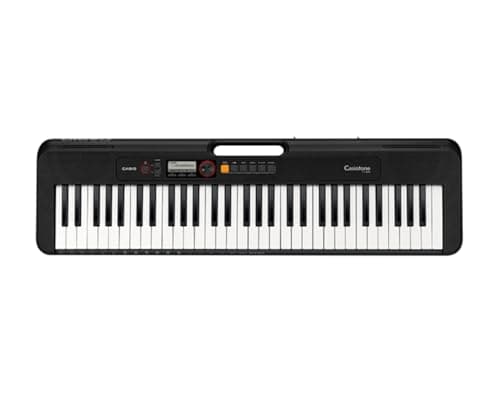 Casio Casiotone CT-S20061 full-size keys, 400 tones and a power supply in the box, at the price where most keyboards still ship with narrow mini keys. | Kids, full-size keysThe honest floor | 7.4 | $144.99 · View on Amazon #ad How we’re funded |
If you would rather have the sound
The deliberate opposite: almost no accompaniment features, and the engineering spent on the piano voice and the speakers instead.
| # | Product | Best for | Score | Price |
|---|---|---|---|---|
| 1 | 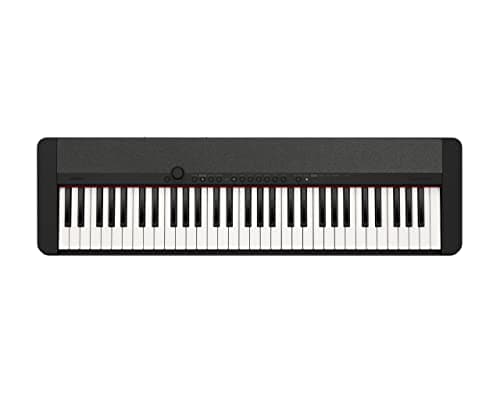 Casio Casiotone CT-S161 full-size touch-sensitive keys, 61 tones and no arranger clutter. | 61 keys, piano sound firstThe honest floor | 7.8 | $199.99 · View on Amazon #ad How we’re funded |
The picks in full
Yamaha PSR-E383
YamahaBest for: Learning tools, 61 keys
61 touch-sensitive keys and 125 lesson songs with hand-separate practice and scoring. The touch response is the spec that matters; the 650 tones are the spec that sells it.
Published specifications
- Keys:
- 61, organ-style (unweighted), touch-sensitive
- Touch response:
- Soft / medium / hard / off
- Polyphony:
- 48 notes
- Tones:
- 650 (258 panel, 25 drum/SFX, 20 arpeggio, 347 XGlite)
- Lessons:
- 125 lesson songs, right/left/both-hand practice with evaluation
- In the box:
- Music rest, PA130 power adapter
What it gets right
- Touch-sensitive keys — playing harder makes it louder, which is the thing a beginner has to learn early and a non-touch keyboard cannot teach
- The lesson mode with hand-separate practice and scoring is genuinely useful, not a gimmick
- Power adapter included, which is not a given at this tier
Where it gives ground
- Unweighted organ-style keys — this will not build the finger strength a piano needs
- 61 keys, so a method book that assumes 88 will eventually run out of instrument
What it is not good at
Preparing anyone for an acoustic piano. If there is a real piano in the child's future, the unweighted action is a habit to unlearn later. Read our 61-versus-88 comparison before deciding.
How the specs score against a beginner’s needs
Scores are our reading of the published specifications above against what a beginner physically needs. They are not test results — we have not played this instrument.
Specifications from Yamaha — PSR-E383 specifications.
Casio Casiotone CT-S200
CasioBest for: Kids, full-size keys
61 full-size keys, 400 tones and a power supply in the box, at the price where most keyboards still ship with narrow mini keys. That one specification is why it is here.
Published specifications
- Keys:
- 61, full-size
- Polyphony:
- 48 notes
- Tones:
- 400
- Rhythms:
- 77
- Display:
- LCD
- Connectivity:
- USB-MIDI
- In the box:
- Power supply, music rest
What it gets right
- Full-size keys at a price where mini keys are the norm — this is the specification that decides whether a child learns a hand span they can keep
- Power supply included, which is not a given and turns a cheap keyboard into an expensive paperweight when it is missing
- Light and simple enough that a child can set it up themselves, which means it gets used
Where it gives ground
- Unweighted keys, so it will not build the finger strength an acoustic piano needs
- 400 tones is a lot of browsing for a child who is meant to be practicing
What it is not good at
Preparing anyone for a real piano. It is a first keyboard for a young child, not a piano substitute — read our weighted-versus-unweighted comparison before assuming otherwise.
How the specs score against a beginner’s needs
Scores are our reading of the published specifications above against what a beginner physically needs. They are not test results — we have not played this instrument.
Specifications from Casio Casiotone CT-S200 published specifications.
Casio Casiotone CT-S1
CasioBest for: 61 keys, piano sound first
61 full-size touch-sensitive keys, 61 tones and no arranger clutter. It is the 61-key board for someone who wants to play piano rather than operate a keyboard.
Published specifications
- Keys:
- 61, full-size, touch-sensitive
- Polyphony:
- 64 notes
- Tones:
- 61, including a stereo grand piano
- Weight:
- 9.9 lb
- Dimensions:
- 36.61" W x 10.15" D x 3.30" H
- Connectivity:
- USB-MIDI
What it gets right
- Deliberately few sounds and a clean panel, which removes the single biggest distraction from actual practice
- 9.9 pounds and 3.3 inches tall — it can live on a shelf between sessions, and an instrument that lives out of the way gets played less
- 64-note polyphony, higher than the PSR-E383's 48
Where it gives ground
- No lesson mode at all, unlike the PSR-E383
- Unweighted keys, same fundamental limit as any 61-key board
What it is not good at
Entertaining a young child. There is no light-up key guidance, no play-along scoring and only 61 sounds. That restraint is the point for an adult beginner and a drawback for a seven-year-old.
How the specs score against a beginner’s needs
Scores are our reading of the published specifications above against what a beginner physically needs. They are not test results — we have not played this instrument.
Specifications from Casio — CT-S1 product page.
Questions people actually ask
What is an arranger keyboard?
A keyboard with auto-accompaniment: you hold a chord with your left hand and the instrument plays a full backing arrangement — drums, bass and harmony — in a style you choose. One player sounds like a band.
Are auto-accompaniment features worth it?
For some players they are the single most motivating feature in the category, and for others they get switched on twice. It depends on whether you want to perform songs immediately or learn to play the piano properly.
Do arranger keyboards teach bad habits?
They can. Playing single-finger chords to trigger accompaniment is not playing piano with two hands, and a student who only does that does not build left-hand technique. Use it alongside real practice, not instead of it.
Do you need 61 keys for an arranger keyboard?
61 is the standard and it is enough. Accompaniment usually splits the keyboard, giving the left hand the chord zone and the right hand the melody, so a shorter keyboard would genuinely run out of room.
Sources
Still deciding?
Every recommendation on this site is built the same way, and the method is published in full — including what we do not do and what would get a pick dropped.
Read next
- Best beginner keyboards: 61 keys that suit real lessons
Touch response over tone count, segmented for children and adult learners, with the 61-key ceiling stated plainly.
- Keyboard specs, and which ones matter
What polyphony really limits, why 700 voices is not a feature, and the four specs that genuinely decide whether a keyboard is good.
- Best keyboards for kids
Why mini keys are disqualifying, and two picks that keep full-size touch-sensitive keys within a child's budget.
- Best portable keyboards
The three specs that decide whether a keyboard actually travels, and the boards that get all three right at a beginner price.
- Piano lessons or a learning app?
What apps do well, the two things only a person can catch, and a hybrid approach that costs a fraction of weekly lessons.